

Parameter Sweeping#
A parameter sweep provides multiple values for one parameter and runs the method once for each value.
How would this be useful when processing data?#
Use a parameter sweep when prototyping a pipeline to compare possible values, especially for an unfamiliar method or dataset.
What does the output look like?#
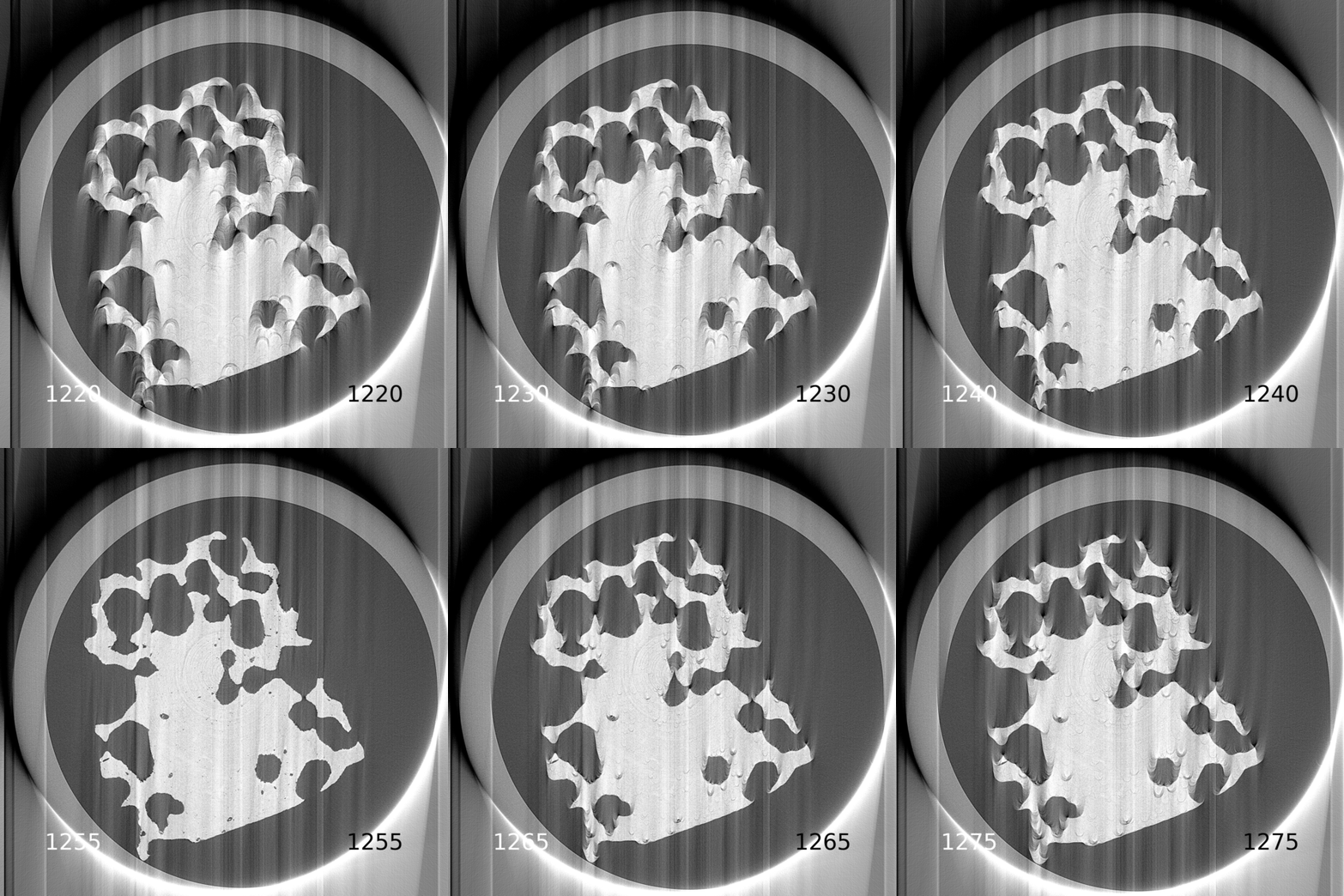
Fig. 13 A sweep used to find the correct Centre of Rotation. Each saved image shows its CoR value. Inspect the images, then enter the best value in the pipeline; see Manual Centering.#
How are parameter sweeps defined in the pipeline YAML file?#
Specify sweep values in either of two ways:
A range defined by start, stop, and step values.
An explicit list of values.
Note
A pipeline can contain only one parameter sweep. HTTomo reports an error and does not run a pipeline containing more than one.
Specifying a range#
Use !SweepRange with start, stop, and step.
Like a Python range, it excludes the stop value. This example sweeps the
reconstruction center parameter from 10 to 40 in steps of 10:
center: !SweepRange
  start: 10
  stop: 50
  step: 10
Specifying each value#
Use !Sweep to provide explicit values. This example sweeps a median
filter’s size parameter over 3 and 5:
size: !Sweep
  - 3
  - 5
Example#
This minimal pipeline uses !Sweep for a median filter’s size
parameter:
- method: standard_tomo
  module_path: httomo.data.hdf.loaders
  parameters:
    data_path: entry1/tomo_entry/data/data
    image_key_path: entry1/tomo_entry/instrument/detector/image_key
    rotation_angles:
      data_path: /entry1/tomo_entry/data/rotation_angle
    preview:
      detector_y:
        start: 10
        stop: 17
- method: normalize
  module_path: tomopy.prep.normalize
  parameters:
    cutoff: 10.0
    averaging: mean
- method: median_filter
  module_path: tomopy.misc.corr
  parameters:
    size: !Sweep
      - 3
      - 5
    axis: 0
Note
Sweep results are saved as images automatically; no image-saving method is required.
How big should the input data be?#
Sweeps are intended to give quick feedback on a small input. Use the loader’s
preview parameter to select no more than seven sinogram slices; see
Previewing. HTTomo reports an error and stops if the preview contains
more slices.
What structure does the output data of a parameter sweep have?#
The sweep output contains the middle slice from each run, concatenated along the middle dimension. This applies to both sinogram and reconstruction slices.
For example, suppose:
the input contains three sinogram slices with shape
(1801, 3, 2560); anda parameter sweep is performed on the
centerparameter of a reconstruction method using ten CoR values.
Each reconstruction produces an array with shape (2560, 3, 2560).
HTTomo takes the middle slice from each of the ten arrays and concatenates them
into an output with shape (2560, 10, 2560). It passes this output to the
next pipeline method, such as one that saves the slices for inspection.